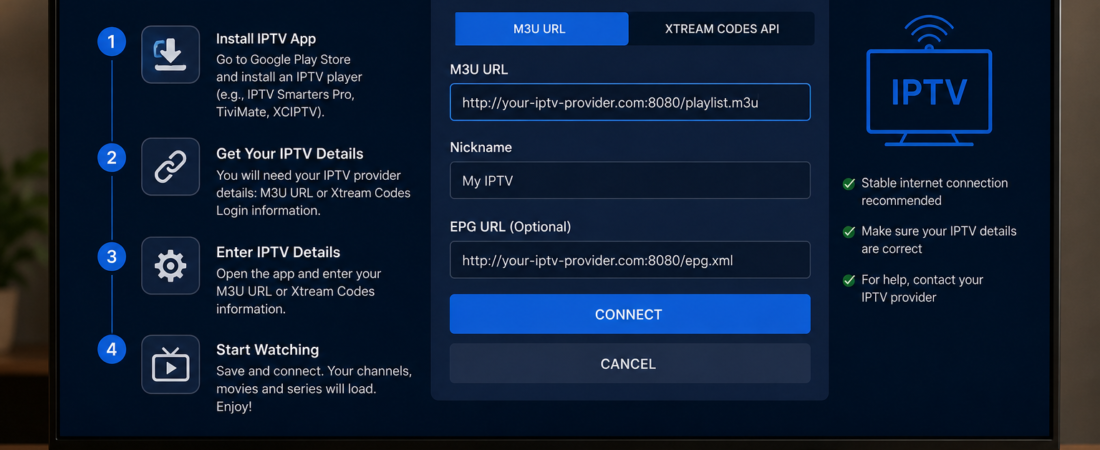
Watching 8K Premium IPTV on an Android TV Box (NVIDIA Shield, Xiaomi Mi Box, T95, etc.) is simple! Follow these easy steps to start streaming in minutes.
What You’ll Need:
- An Android TV Box (any model)
- Your Strong 8K IPTV login details (sent after purchase)
- Stable internet connection (15+ Mbps recommended for 4K)
Step-by-Step Setup Guide
1. Install an IPTV Player App
Since Android TV Boxes support apps, you’ll need a media player like:
- IPTV Smarters Pro (Most popular)
- TiviMate (Best for live TV)
- Perfect Player (Simple & lightweight)
How to Install:
- Open the Google Play Store on your Android TV Box.
- Search for your chosen IPTV player (e.g., “IPTV Smarters”).
- Click Install and wait for the download.
(If your device doesn’t have Google Play, download the APK from a trusted source.)
2. Open the App & Enter Your IPTV Details
- Launch the IPTV app you installed.
- Select “Login with Xtream Codes” (or similar).
- Enter the username, password, and server URL we provided.
- Click “Add User” or “Login”.
3. Start Watching IPTV!
- Once logged in, you’ll see:
- Live TV (26,000+ channels)
- Movies & TV Shows (180,000+ VOD)
- EPG (TV Guide) for schedules
- Use your remote to browse and enjoy!
Troubleshooting Tips
🔹 Buffering? Try:
- A wired Ethernet connection (better than WiFi).
- Lowering the video quality in settings.
- Using a VPN (if your ISP throttles streaming).
🔹 App Not Working?
- Clear the app’s cache/data in settings.
- Reinstall the IPTV player.
- Check if your subscription is active.
🔹 No Picture/Sound?
- Ensure your Android TV Box supports the video format.
- Try a different IPTV player app.
Why Use an Android TV Box for IPTV?
- Better Performance : Smoother than Smart TVs.
- More App Choices : Install any IPTV player.
- 4K/8K Streaming : Full HD without lag.
- No Restrictions : Unlike some Smart TV app stores.
Ready to Start Streaming?
Get 8K Premium IPTV Subscription Now!
Need help? Contact our 24/7 support!